






AI Project Co-Pilot
AI Systems Portfolio · Project planning and decision support
AI Project Co-Pilot
From scattered project information to a clear next step
An AI assistant that turns your notes, ideas and updates into a practical project brief: priorities, next actions, risks, pending decisions and communication drafts.
Designed for project managers, consultants, founders, freelancers and small teams. You choose the focus and depth, review the recommendations, and keep control of decisions and actions.
System value · AI integration example · Retreat example · Explore the details
System value
The problem. Project information is spread across notes, messages and documents. Preparing an action list, checking risks and writing an update often means reading the same material several times. Missing facts can also make a proposed plan look more certain than it is.
The solution. Co-Pilot brings the relevant information into one structured first draft, making priorities, dependencies, uncertainties and the next decision easier to review.
Less preparation work
Reduce repeated extraction, organization and first-draft writing when preparing briefs, plans and stakeholder updates.
Clearer decisions
Compare options and trade-offs, identify missing evidence, and see which decisions or approvals are still needed.
Visible risks and gaps
Bring blockers and dependencies into view. Keep proposed owners, dates and actions distinct from confirmed commitments.
Before: read scattered material, build an action list, review uncertainties and write an update separately.
After: review one integrated draft, resolve the open points and finalize your next actions.
The expected benefit is less preparation effort. Time savings and business impact have not yet been measured.
How it works
- Share the project context. Provide your goal, relevant notes, updates and documents the assistant can access.
- Choose the output. Select quick, standard or deep work; choose a plan, intake brief, risk review, decision support, communication draft or full review. Choose whether to prepare or reuse a manually saved project memory summary.
- Review and act. Check facts and assumptions, confirm owners and dates, make decisions, and carry out the actions yourself.
A full standard review brings together the project summary, current situation, goals, tasks, risks, decisions, communication needs and a recommended next action.
In action: shaping an AI integration project
A raw idea becomes a first project brief for a mid-sized company introducing AI into internal operations. The supplied context identifies employees and managers as users, Google Workspace as the existing environment, and a medium-depth brief as the initial output.
Co-Pilot structures the idea into proposed use cases, scope, phases, stakeholder roles, governance questions and success measures. The panels below summarize the resulting brief.
Brief at a glance
AI enablement for internal operations
Organization: mid-sized company
Users: employees and managers
Environment: Google Workspace
Three proposed pilot uses
01 · Meeting follow-through
Summaries, action items and next steps for review.
02 · Document drafting
First drafts and reviews of internal documents.
03 · Internal communication
Email drafting, rewriting and summarization.
Proposed roadmap
From discovery to adoption
01 · Month 1
Discovery & readiness
Map workflows, assess data access and select useful pilot cases.
02 · Month 2
Governance & pilot design
Define approved uses, data boundaries, human review and training.
03 · Months 3–4
Controlled pilot
Test selected use cases with a small group; collect feedback and productivity data.
04 · Months 5–6
Evaluate & roll out
Review evidence, improve the approach, and prepare training and wider adoption.
05 · Month 7 onward
Optimize & scale
Refine workflows and consider additional teams and integrations.
Illustrative timing from the first draft; subject to discovery, resources and approval.
The next decision: which department should be the first pilot group?
What to measure: preparation time, output quality, weekly adoption and policy exceptions. These are proposed evaluation criteria, not observed improvements.
This example demonstrates project intake and planning support. It does not show a deployed Google Workspace integration or a completed client implementation.
In action: planning a climate leadership retreat
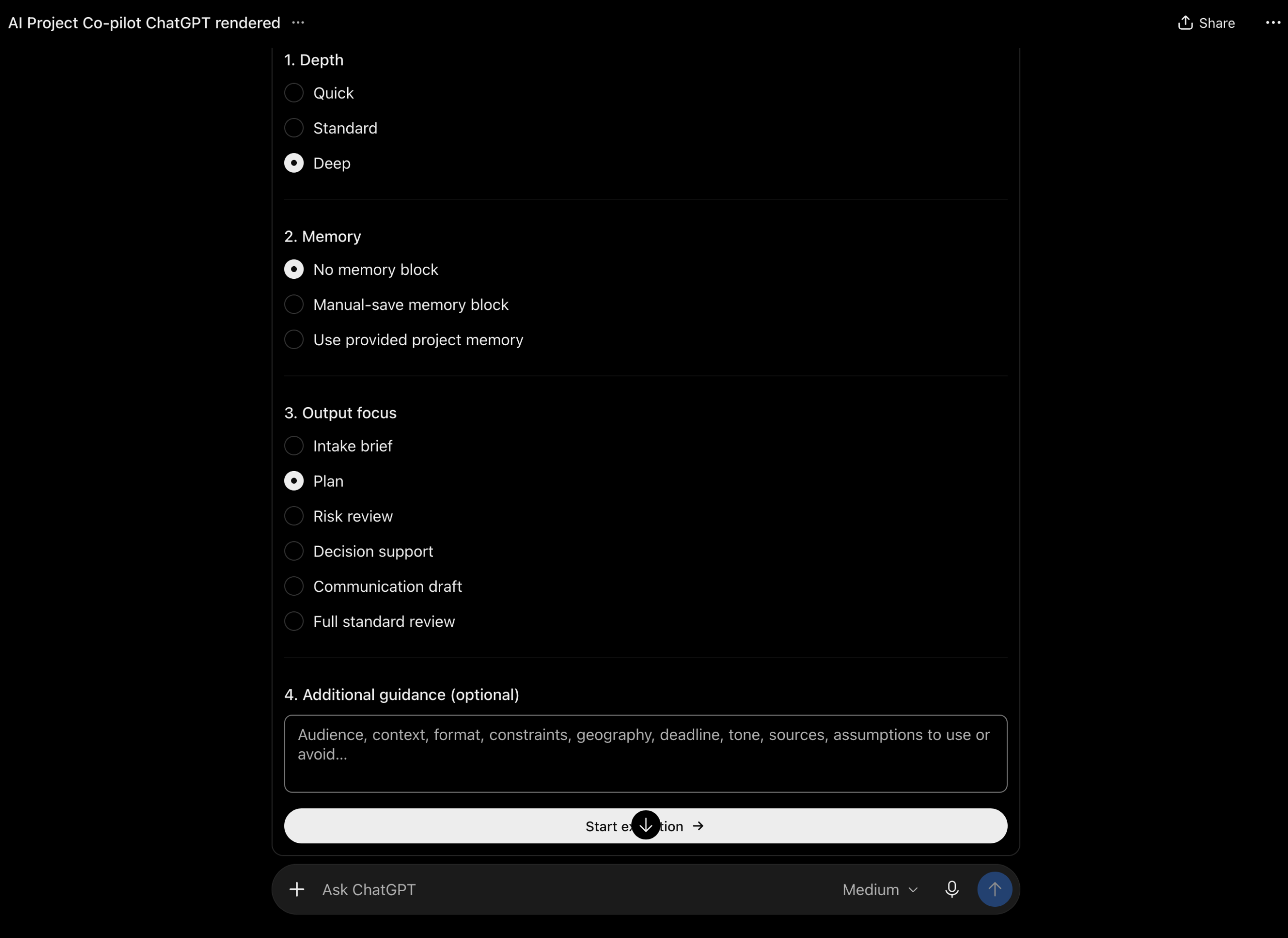
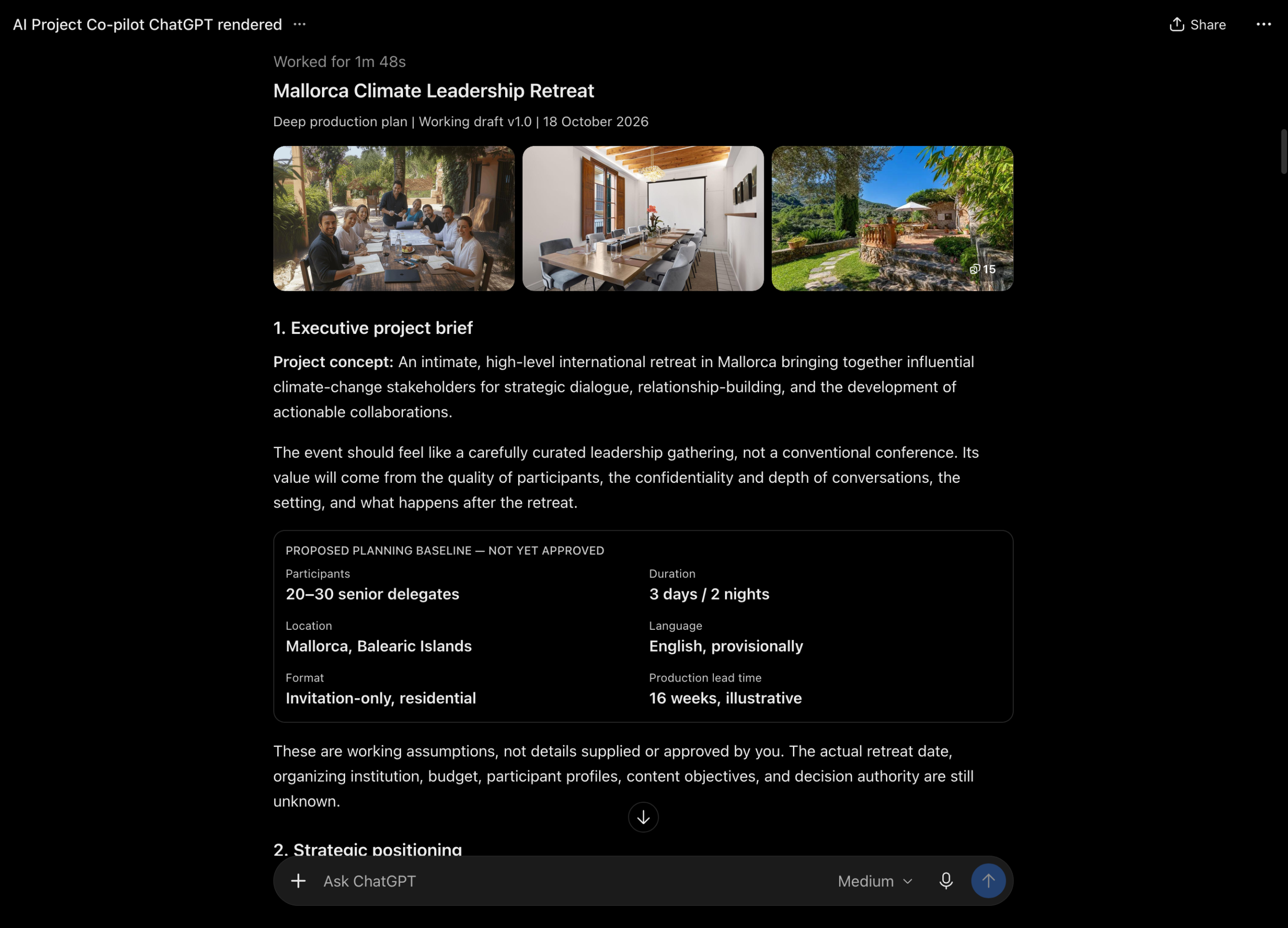
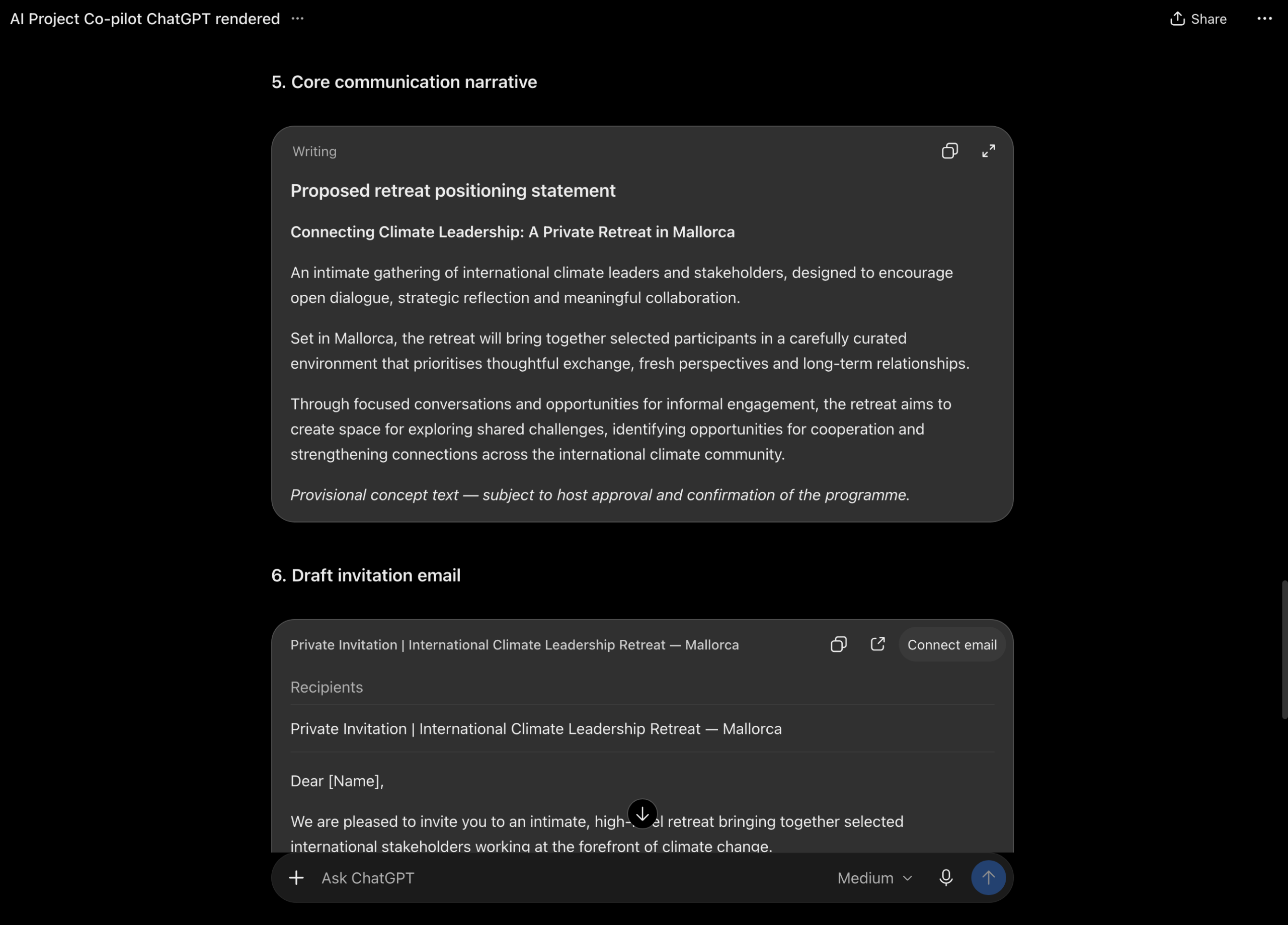
The supplied demonstration starts with a brief request: plan a small retreat in Mallorca for international climate-change stakeholders. Co-Pilot develops a working production plan and, in a separate request, a communication brief for the same concept.
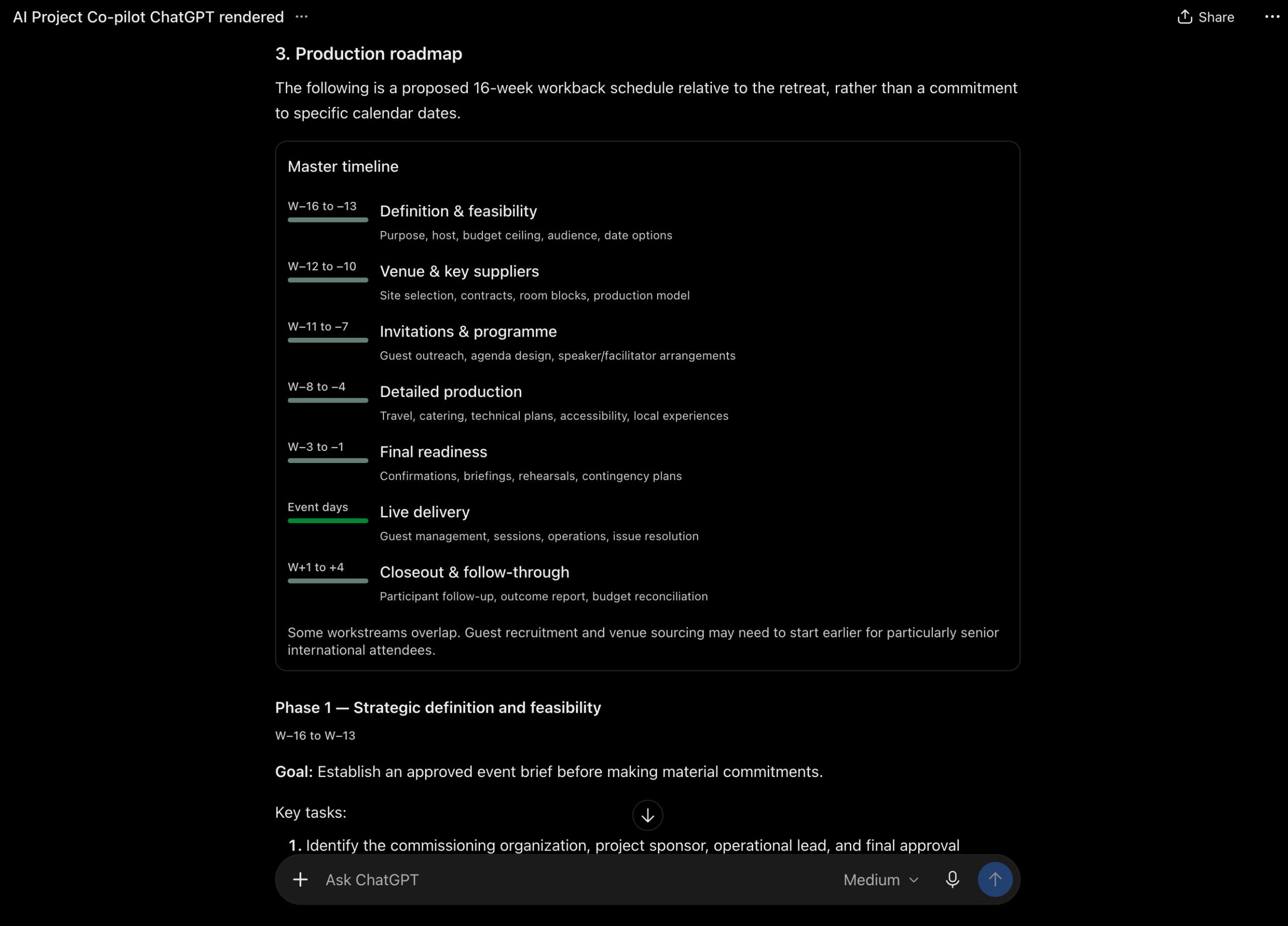
The example shows how a short brief can become material for a project discussion: an executive overview, a proposed roadmap and draft messaging. Participant numbers, timing and other planning parameters are explicitly marked as assumptions requiring approval.
This is a planning demonstration, not evidence of a delivered event or measured client results. The screenshots show the ChatGPT presentation of the output; appearance and interactive elements depend on the environment.
1. Choose the execution setup
2. Build a project brief
3. Structure the next steps
4. Prepare communication
Select any screenshot to open it at full size.
Human review is part of the workflow
Co-Pilot supports preparation and judgment. Its recommendations remain proposals: a named owner has not necessarily accepted a task, a suggested date is not a commitment, and a draft message has not been approved or sent.
The documented version works through conversation. It does not monitor projects, contact stakeholders, create calendar events, assign tasks or update project platforms. Its understanding depends on the current material you supply. For continuity, save the optional memory summary yourself and provide it in a later conversation.
Explore the details
Open a section for a closer look at the design and practical use.
Six complementary roles, one integrated response
I designed Co-Pilot as a reusable prompt workflow. It reviews project material through six internal role stages and combines the relevant findings into one response:
- Project coordination: selects the relevant work, reconciles findings and checks the final brief.
- Project clarification: identifies goals, scope, status and open questions.
- Context extraction: gathers useful information from the material actually supplied.
- Strategy and planning: structures priorities, phases, tasks and dependencies.
- Risk and decisions: surfaces blockers, trade-offs and pending approvals.
- Communication: prepares updates, messages and agendas for review.
These are role stages within the prompt workflow. They do not imply six independently deployed agents or external integrations. The result can still be incomplete or incorrect, so source checking and human review remain necessary.
Where the value comes from, and how to measure it
The most direct expected value is reduced preparation time. Clearer options and more visible uncertainty may also support better decisions and risk awareness.
- Context and first drafts: compare the minutes needed to organize source material and finalize a brief.
- Actions and dependencies: review important tasks missed, corrections required, and unconfirmed commitments.
- Risk and decisions: assess whether surfaced risks are relevant and decision items include options, missing information and a next step.
- Communication and continuity: track the effort to approve a draft or resume work from a saved memory summary.
Compare similar tasks with and without Co-Pilot, using the same final quality criteria. Include input preparation, interaction, checking and corrections in the assisted time.
Net preparation time saved = manual preparation time − total assisted preparation time.
Measure the complete workflow once to avoid counting overlapping benefits twice. No numerical savings, ROI or faster project delivery claim is established by the supplied documentation.
Useful applications and a simple starting brief
Useful starting points include a new project idea, meeting notes, a status update, a blocked workstream, a choice between options, or a stakeholder message. It can support consulting, events, research, communication and small-business projects.
Our project goal is ___. The current situation is ___. Here are the relevant notes and constraints. Prepare a standard plan. Use no memory block. Mark missing information and assumptions, and identify the next decision we need to make.
Use a narrow request when you need one output; request a deeper review when the material or decisions warrant it. Browsing, live project data, persistent memory and external tools are not included by default. Domain-specific legal, financial, medical or compliance judgments require qualified review.
Bring more clarity to your project workflow
Co-Pilot is one example of how I connect AI system design, project coordination and human review. Get in touch to discuss a workflow for your project or team.
Back to AI Systems Portfolio · AI Workflow Design · AI Testing, Evaluation & Research · Project Management